

Quick Start
Welcome to the Keevx API. Our mission is to make professional AI video production as simple as a single API call. Whether you are localizing content with Video Translation or breathing life into stills with Image-to-Video translating videos, this guide will help you get your first video rendered in minutes.Prerequisite
Before you start coding, ensure you have the following ready:- A Keevx Account: Sign up at keevx to access API Management.
- API Credentials: Navigate to your Dashboard to generate your unique API Key. These credentials are required to authenticate every request.
- Credits: Ensure your account has sufficient credits. You can start with our Free Plan (10 free credits) or upgrade to a Subscription Plan for higher concurrency and volume.


Pricing
Overview of API pricing plans and credit consumption for Keevx.API Pricing Plans
Choose the plan that best fits your production scale. Each tier includes a set amount of monthly or annual credits and defines your API concurrency limit.| Plan Tier | Price | Included Credits | Concurrency | Note |
|---|---|---|---|---|
| Free | $0 | 10 (One-time) | Basic | Single claim only |
| Starter | $99 / mo | 1,000 / mo | 1 | No watermark |
| Pro | $299 / mo | 3,200 / mo | 3 | No watermark |
| Enterprise A | $1,999 / yr | 25,000 / yr | 5 | 20% off |
| Enterprise B | $3,999 / yr | 52,000 / yr | 10 | 23% off |
| Enterprise C | $7,999 / yr | 110,000 / yr | 20 | 27% off |
Plan Management: We support instant or next-cycle upgrades/downgrades. If you have multiple active plans, credits stack automatically, and we prioritize consuming the oldest credits first.
Understanding API Credits
Keevx API credits are consumed based on the functionality used and the duration of the output.1. Video Translation
| Functionality | Credit Cost | Logic |
|---|---|---|
| Video Translation | 5 Credits | Per 30-second increment |
2. Image to video
The cost of generating videos depends on the underlying engine (model) and specific output settings.| Model | Audio | Resolution | Credit Cost |
|---|---|---|---|
| Standard | With Audio | - | 4 Credits / sec |
| Standard/Pro Model | Without Audio | - | 2 Credits / sec |
Key Policies
- Auto-Recharge: You can set up auto-recharge rules in the Dashboard to prevent service interruptions when your balance is low.
- Concurrency Control: Your maximum simultaneous API requests are determined by your current plan tier. Upgrading your plan will immediately increase your concurrency limit.
- Expiration: Monthly credits expire at the end of the billing cycle and do not roll over. Annual Enterprise credits are valid for one year.
Getting Help
We are committed to supporting your development journey. If you encounter any technical hurdles or have questions about credit scaling, please email [email protected].Credentials & Access
Every request made to the Keevx API must be authenticated using a valid API Key. These credentials identify your application and ensure your tasks are processed according to your specific plan and concurrency limits.How to Obtain Your Credentials
You can generate and manage your API keys directly from the Keevx platform. There are two primary ways to access the API Management console:- Option 1: Sidebar Access: Click the API Management button located at the bottom of the left-hand sidebar on your homepage.

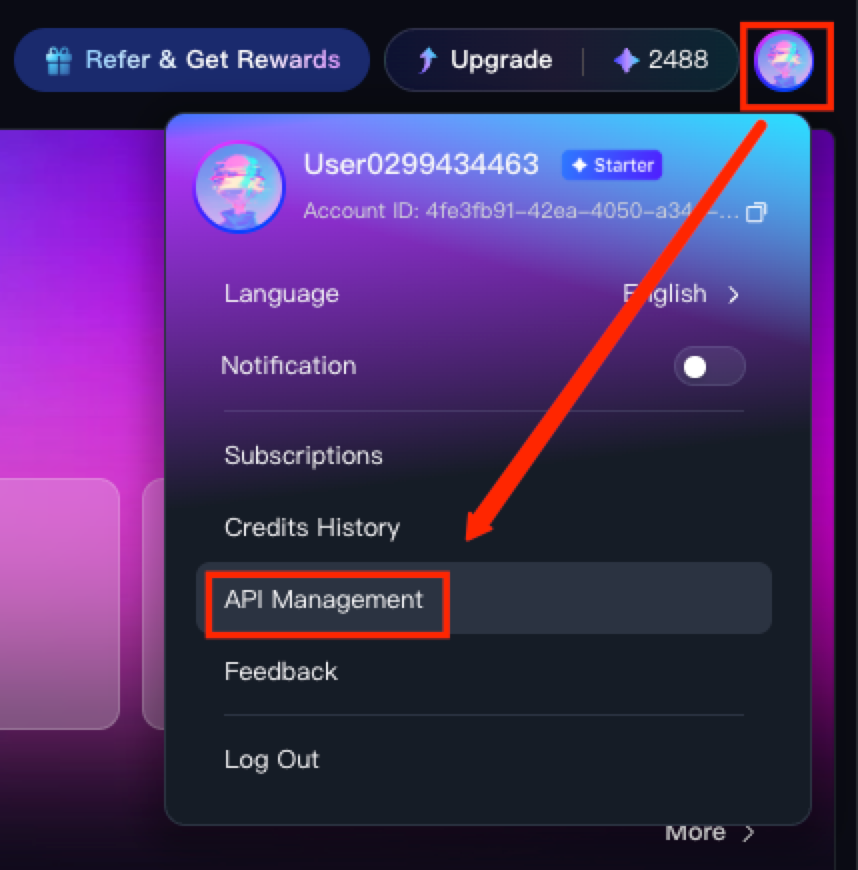
- Option 2: Profile Menu: Click on your user avatar in the top-right corner and select API Management from the dropdown menu.
Plan Eligibility
Free version users can receive 10 credits. Users who require more usage can upgrade to a paid plan:- Starter, Pro, and Enterprise users can access the full suite of Video Translation and Video Generation tools.
- Your maximum concurrency (the number of tasks you can run simultaneously) is tied to your specific plan tier.
Security Best Practices
Your API Key is a sensitive secret that grants access to your credit balance and project data.- Keep it Private: Never expose your API Key in client-side code (browsers) or public repositories like GitHub.
- Immediate Reset: If you suspect your key has been compromised, use the Regenerate button in the API Management dashboard to revoke the old key and issue a new one immediately.